Netutilus for macOS
Network Utility for Mac.
Zero Terminal required.
Netutilus brings back the Network Utility Apple removed from macOS, with nineteen tools: Internet Check, ping, traceroute, MTR, port scans, DNS, SSL, speed tests, LAN scanning and Wi-Fi analysis, in one fast, native window. Nothing here shells out to a command line.
Download on the App StoremacOS 14.6 or later · Free, with Netutilus Pro a one-time $9.99
Speed TestCompleted
Download
349.3Mbps
Good for 4K streaming
Upload
354.4Mbps
Good for 4K streaming
Latency
18ms
Excellent
Jitter
1.2ms
Excellent
B
Bufferbloat
Latency 17.8 ms idle, 50.9 ms under load
Cloudflare1179 RPM responsiveness
One window
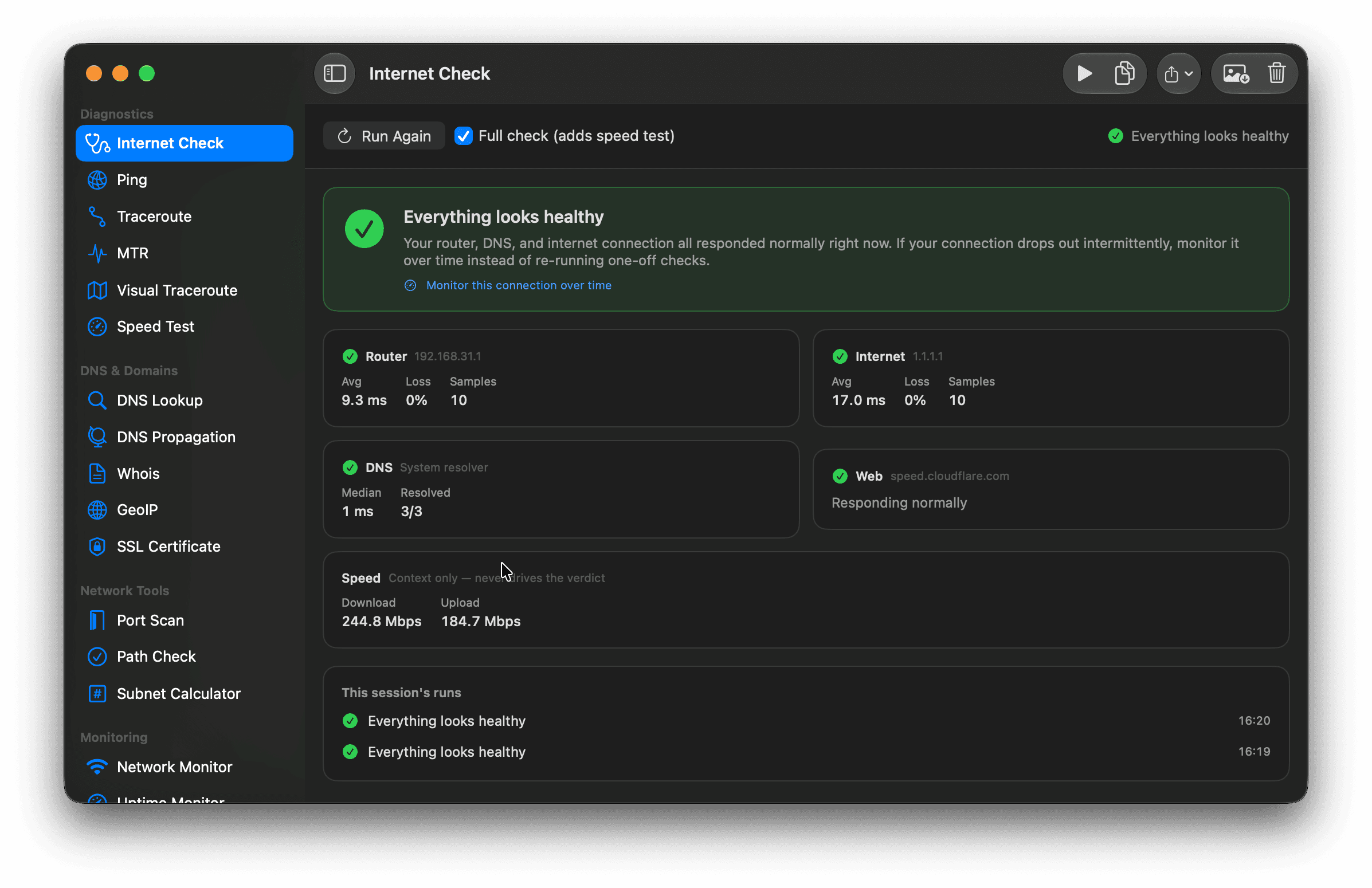
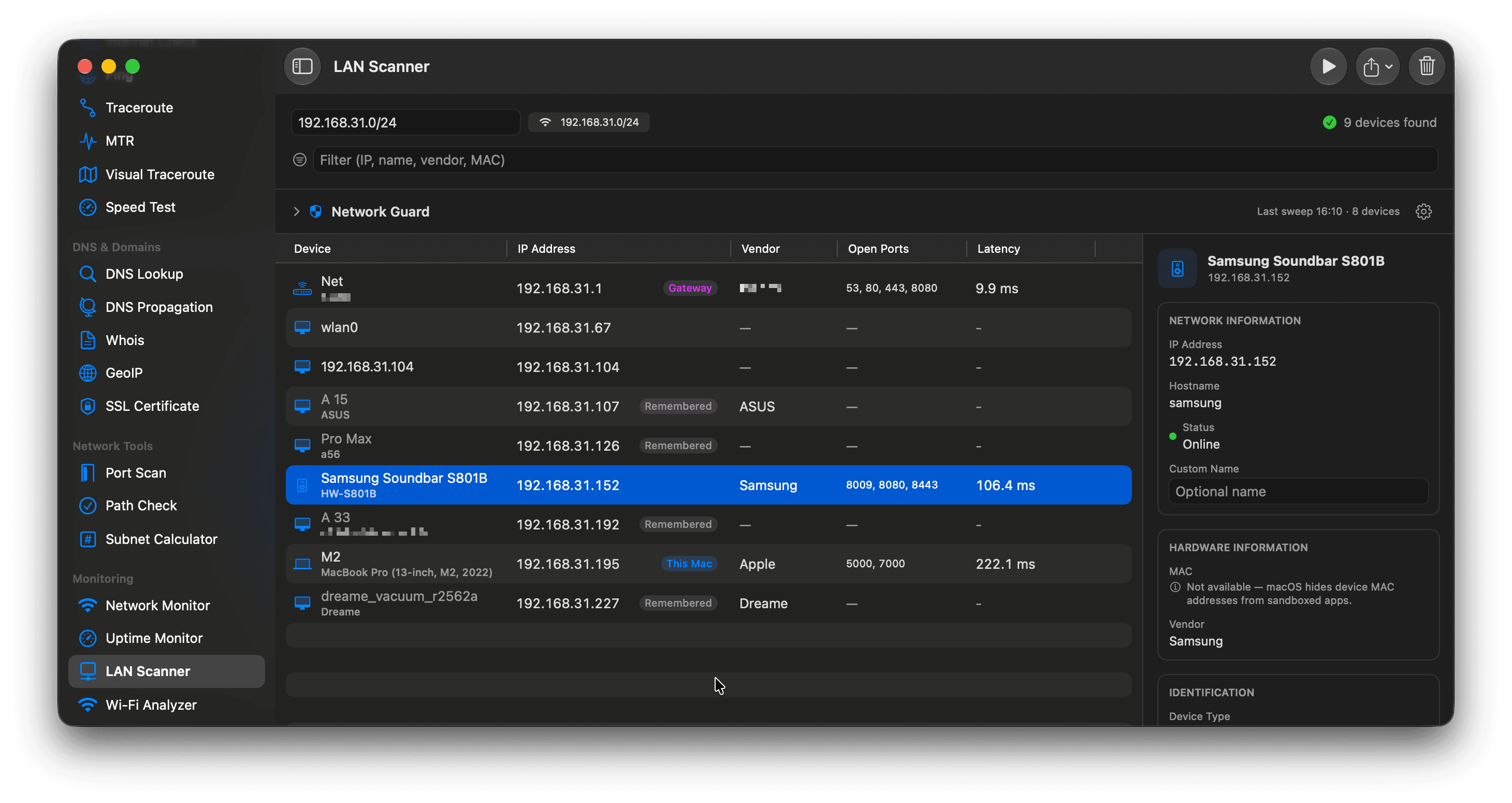
Internet Check and LAN Scanner, in the actual app.
Native macOS diagnostics that read like answers, not like command output.
One click, one straight answer
Router, DNS, internet route and web reachability are checked together and summed up in a single verdict, with the numbers behind it. Speed is context only; it never decides the result.
Every device on your network, named
Sweep the subnet and get each device with its IP, vendor, open ports and latency, plus a detail pane for the one you select. Network Guard remembers what belongs there and flags what does not.
The toolkit
Nineteen network tools for macOS, in one app.
Grouped exactly as they are in the sidebar. Everything unmarked is free.
Diagnostics
Internet Check
One button answers "is it my network or my ISP?" Router, DNS, internet route and web reachability checked together, with an exportable report.
Ping
TCP connect timing with a live latency chart, rolling statistics, and continuous monitoring.
Traceroute
Map every hop to a host with per-hop latency, using native ICMP probes.
MTR
ProContinuous traceroute with rolling loss, last, avg, best, worst and stdev per hop.
Visual Traceroute
ProWatch each hop plotted across a real map via GeoIP.
Speed Test
Download, upload and jitter via Cloudflare, plus a Waveform-style bufferbloat grade. Pro adds scheduled runs, a trend chart and an ISP report.
DNS & Domains
DNS Lookup
Query A, AAAA, MX, NS, TXT and more, against the system resolver or a DNS server you choose.
DNS Propagation
Check a record across public resolvers worldwide to confirm a change has landed.
Whois
Registrar, creation and expiry dates, status and name servers, via IANA referral to the real registrar.
GeoIP
Locate any IP on a map with city, country, ISP and AS details.
SSL Certificate
Inspect the TLS chain, validity dates, key type and days remaining before expiry.
Network Tools
Port Scan
Concurrent TCP scanning with color-coded results, and an optional second pass that reads what each open port says about itself.
Path Check
Verify a host:port is reachable and inspect the route, interface and IPv4/IPv6 support behind it.
Subnet Calculator
CIDR maths offline: network, broadcast, usable range, mask and host count.
Monitoring
Network Monitor
Live connectivity, link type, IPv4/IPv6/DNS capability and active interfaces.
Uptime Monitor
ProWatch hosts with TCP, ICMP, HTTP(S), SSL-expiry or port checks on a schedule, with notifications and a menu bar status.
LAN Scanner
ProDiscover every device on your subnet: IP, name, model, vendor, open ports and latency. Network Guard alerts you when a new one appears.
Wi-Fi Analyzer
ProLive signal, noise, rate, channel and PHY mode, plus a gateway-vs-internet latency verdict.
Wi-Fi Networks
ProScan the neighbours, see the per-band channel graph, and get a channel recommendation.
Why Netutilus
Built like a native Mac app.
No Terminal, no wrappers
Netutilus never shells out. Every tool is built directly on Network.framework, dnssd, CoreWLAN and raw ICMP sockets, so the results are the app’s own, not scraped command output.
One app instead of five
Ping, traceroute, MTR, port scanning, speed tests, DNS, SSL, whois, GeoIP, LAN and Wi-Fi: nineteen tools sharing one window and one set of shortcuts.
Answers, not just numbers
Internet Check names the culprit, Speed Test grades bufferbloat A+ to F, Wi-Fi Analyzer separates a bad router from a bad line, and Network Guard tells you when a new device appears.
Export everything
CSV, plain text, JSON, clipboard and PNG chart export from the tools that produce them, plus shareable reports from Internet Check and Speed Test.
12 languages
English, German, Spanish, French, Italian, Japanese, Korean, Dutch, Portuguese, Russian, Ukrainian, Chinese.
Sandboxed & private
No analytics, no tracking, no accounts, no data collection. Fully sandboxed and App Store compliant. Nothing leaves your Mac but the probes you asked for.
Your network diagnostics,
simplified.
Free to download, and most of it stays free. One optional $9.99 purchase unlocks MTR, Visual Traceroute, Uptime Monitor, LAN Scanner and both Wi-Fi tools. Once, not every month.
macOS 14.6 Sonoma or later · Version 1.15
FAQ
Common questions about Netutilus.
What can Netutilus do?
Netutilus brings back what Apple removed with Network Utility, and then some: nineteen tools including Internet Check, ping, traceroute, MTR, port scanning, DNS, SSL, Whois, GeoIP, speed tests, a LAN scanner and Wi-Fi analysis, in one native Mac app, with no Terminal required.
Is Netutilus free?
Yes, and most of it stays free. Netutilus Pro is a one-time $9.99 purchase, never a subscription, unlocking MTR, Visual Traceroute, Uptime Monitor, LAN Scanner, Wi-Fi Analyzer and Wi-Fi Networks.
Does Netutilus need an account or send data anywhere?
No accounts, no tracking, no cloud. Network requests go only to the hosts you test, and nothing about you is collected or transmitted.
Which Macs does Netutilus support?
Netutilus requires macOS 14.6 or later and is available on the Mac App Store.